
changelog
Bespaar tijd en geld met Neno
Ons team staat voor je klaar en helpt je zonder stress aan de slag te gaan
1
Nieuwe features
100+
Uren bespaard
WhatsApp Agent: Beta
Een geselecteerde groep gebruikers kan nu facturen en uitgaven indienen en inzichten opvragen over hun Neno-account.
Je kunt nu een foto van een bon of factuur naar Neno sturen via WhatsApp. Onze AI haalt automatisch de relevante gegevens op en verwerkt deze in je administratie.
De WhatsApp-assistent begrijpt context, onthoudt eerdere gesprekken en kan vragen beantwoorden over documenten die je hebt geüpload. Zo voeg je bonnetjes en facturen toe aan je boekhouding zonder in te loggen of handmatig gegevens over te nemen.
Nieuwe look voor Neno: We hebben Neno opnieuw ontworpen. Ontdek wat er is veranderd.
De volledige Neno-applicatie heeft een frisse nieuwe uitstraling en een verbeterde gebruikerservaring gekregen.
Wat is er veranderd?
Neno heeft een volledig vernieuwde uitstraling gekregen.
We hebben belangrijke onderdelen van het platform, waaronder transacties, overboekingen en rekeningen, opnieuw ontworpen met een overzichtelijkere interface, betere navigatie en een duidelijkere informatiestructuur.
Daardoor vind je sneller wat je zoekt en wordt het beheren van je financiën eenvoudiger en intuïtiever.
Waarom dit belangrijk is
Sinds de lancering hebben we ons gericht op het snel ontwikkelen van nieuwe functionaliteiten en het verbeteren van het platform op basis van feedback van klanten.
Nu steeds meer ondernemers Neno gebruiken, zetten we de volgende stap: een ervaring die net zo goed aanvoelt als de producten die we bouwen.
Deze redesign vormt de basis voor een consistenter en gebruiksvriendelijker platform, zodat we sneller nieuwe functionaliteiten kunnen uitrollen zonder in te leveren op kwaliteit.
Verbeteringen en fixes
We hebben het inlogproces verbeterd. Inloggen gaat nu sneller en met minder stappen.
Ook de kluis heeft een vernieuwd ontwerp gekregen, waardoor documenten eenvoudiger te vinden en te beheren zijn.
Daarnaast hebben we het proces voor het aanmaken van betaalkaarten verduidelijkt. Je krijgt vooraf beter inzicht in de beschikbare opties en vervolgstappen, zodat je sneller aan de slag kunt.
Facturatie: sjablonen, huisstijl en betaallinks
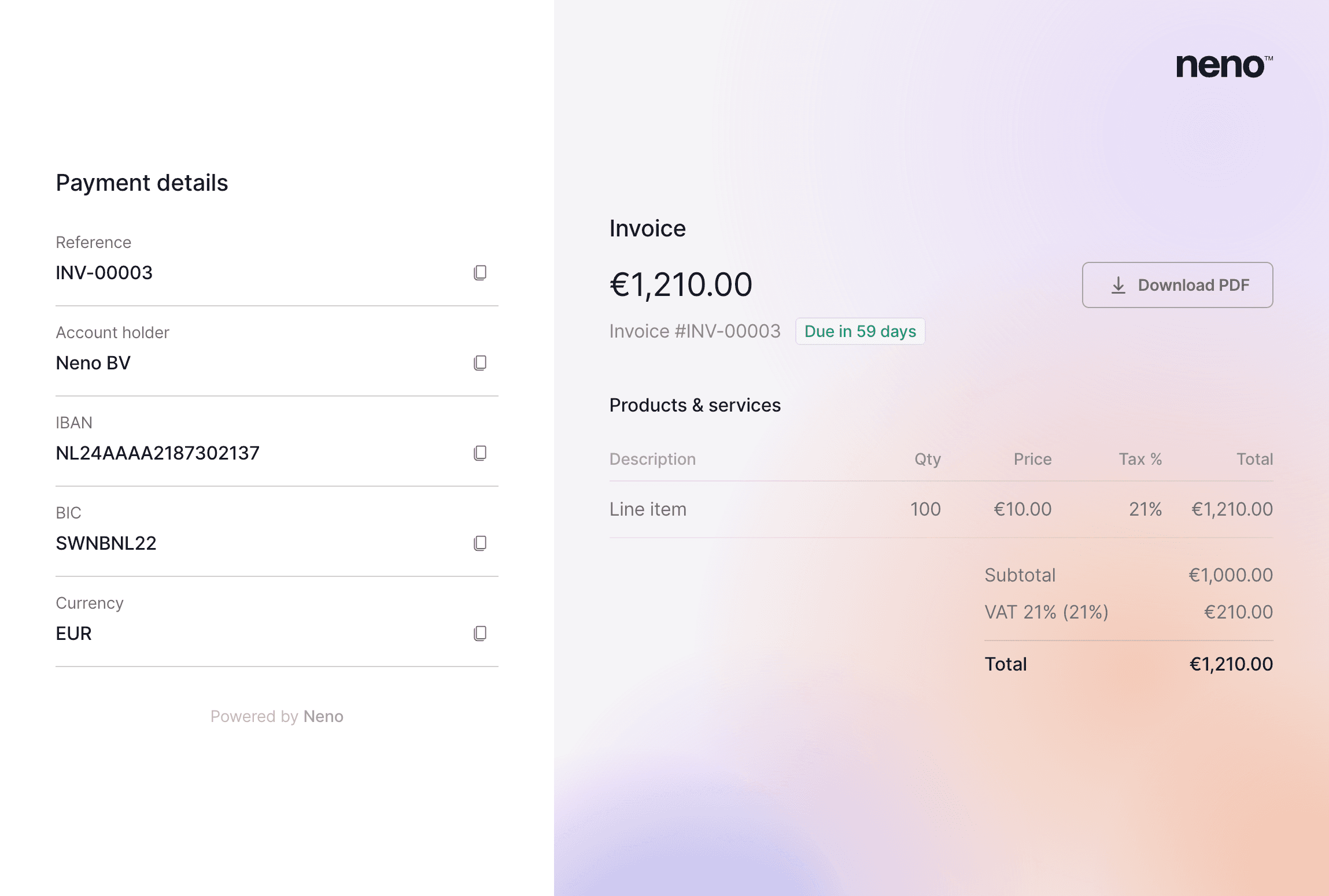
Geef elke factuur een professionele uitstraling met verschillende sjablonen, je eigen bedrijfslogo en uitgebreide personalisatieopties. Ook hebben we voorbeeldteksten toegevoegd voor algemene voorwaarden, zodat je sneller aan de slag kunt zonder alles zelf op te stellen.
Kies uit meerdere factuursjablonen, upload je bedrijfslogo en pas de uitstraling van je facturen aan. Zo verstuur je facturen die passen bij je merk, zonder extra werk.
We hebben daarnaast voorbeeldteksten toegevoegd voor algemene voorwaarden, zodat je niet vanaf een lege pagina hoeft te beginnen.
Elke factuur bevat een betaallink, waarmee klanten direct kunnen betalen. Belangrijke betaalgegevens worden automatisch ingevuld in hun bank- of betaalapp, waardoor betalingen sneller en eenvoudiger verlopen.
Facturen zijn nu ook gekoppeld aan je bedrijfsgegevens. Bedrijfsnaam, adres en rekeningnummer worden automatisch opgehaald uit de geselecteerde entiteit.
Beheer je meerdere bedrijven via Neno? Dan kun je verschillende entiteiten toevoegen en per factuur kiezen namens welk bedrijf je factureert.
Verbeteringen en fixes
Factuurregels zijn verbeterd. Het btw-tarief staat nu standaard op het Nederlandse standaardtarief en het omschrijvingsveld schaalt automatisch mee met de inhoud.
Daarnaast hebben we bij elke factuur een geschiedenis- en activiteitenoverzicht toegevoegd. Zo zie je in één oogopslag wanneer een factuur is aangemaakt, gewijzigd, verzonden, bekeken of betaald.
Richt je bedrijf op vanaf je telefoon
Het oprichtingsformulier is vernieuwd met een overzichtelijker ontwerp, verbeterde invoervelden en directe ondersteuning tijdens het invullen.
Ons oprichtingsformulier is vernieuwd met een overzichtelijker ontwerp, verbeterde invoervelden en ingebouwde ondersteuning.
Telefonische ondersteuning, chat en een speciaal hulpscherm zijn nu direct vanuit het formulier beschikbaar. Zo krijg je hulp wanneer je die nodig hebt, zonder je voortgang te verliezen.
Ook de zijbalk van het oprichtingsproces is volledig vernieuwd voor mobiel gebruik. Of je nu een telefoon, tablet of laptop gebruikt, het proces voor het oprichten van een bv past zich automatisch aan voor een optimale ervaring.
Verbeteringen en fixes
Je ziet nu een realtime indicatie van de verwachte verwerkingstijd in het oprichtingsdashboard. Zo weet je precies waar je staat in het proces van het oprichten van je bedrijf.
We hebben daarnaast een nieuwe kostencalculator toegevoegd. Hiermee krijg je direct inzicht in de kosten van het oprichten van één of meerdere bedrijven, afgestemd op jouw situatie.
Voor bv's met één aandeelhouder is het niet langer nodig om bedrijfsdocumenten aan te leveren bij het aanvragen van een zakelijke rekening. We halen de benodigde gegevens automatisch voor je op.
Tot slot hebben we het inlogproces verbeterd voor gebruikers die wisselen tussen bedrijfsoprichting en bankieren, zodat je naadloos tussen beide onderdelen van het platform kunt navigeren.
Geplande facturen: verstuur automatisch op het juiste moment
Kies een verzenddatum en Neno doet de rest. Facturen worden automatisch verstuurd op het juiste moment, zodat je nooit meer handmatig hoeft op te volgen.

Kies wanneer een factuur wordt verstuurd en Neno doet de rest. Verzending en opvolging verlopen automatisch, zodat je nooit meer handmatig hoeft bij te houden wat er openstaat.
Ideaal voor terugkerende facturen en facturatie aan het einde van de maand.
Verbeteringen en fixes
Creditfacturen kunnen nu worden aangemaakt voor zowel verzonden als betaalde facturen.
Bedrijfs- en klantgegevens kunnen nu ook na het aanmaken van een factuur worden aangepast.
Factuurreferenties zijn nu eenvoudig te kopiëren vanaf de betaalpagina.
Automatische koppeling van facturen aan ontvangen betalingen wordt nu ondersteund voor eenvoudigere reconciliatie.
Verbeteringen aan de mobiele pagina voor overboekingen.
Probleem opgelost in het e-mailverificatieproces; e-mailgegevens worden nu correct doorgegeven tijdens het inloggen.
Send invoices directly from Neno
We hebben de herkenning en categorisatie van uitgaven verbeterd, waardoor je administratie overzichtelijk blijft zonder extra handmatig werk.

Wat is er veranderd
De uitgavenflow gebruikt nu nauwkeurigere categorisatie en geeft duidelijkere suggesties tijdens de controle. Ook hebben we verbeterd hoe terugkerende en vergelijkbare transacties worden verwerkt, waardoor alles consistenter aanvoelt.
Waarom dit belangrijk is
Dit bespaart tijd voor teams die veel transacties controleren en maakt de maandafsluiting minder repetitief. Daarnaast blijft je administratie overzichtelijker, wat helpt om fouten in rapportages of belastingaangiftes te voorkomen.
Verbeteringen en fixes
Betere automatische categorisatie van veelvoorkomende zakelijke uitgaven
Minder handmatige correcties tijdens controle
Verbeterde verwerking van terugkerende transacties
Duidelijkere categorievoorstellen bij uitzonderingen
Snellere controleflow voor accountants en founders
Consistentere resultaten bij vergelijkbare transacties
Lees meer over categorisatie van uitgaven.
Register your BV through Neno
Salarisprocessen zijn nu overzichtelijker, met een duidelijker traject van controle tot indiening. We hebben belangrijke stappen opnieuw ingericht, zodat je sneller ziet wat aandacht nodig heeft en salarisadministratie met minder heen-en-weer kunt afronden.
Wat is er veranderd
The payroll interface now surfaces important actions earlier in the process and makes status updates easier to understand. We also improved navigation between employee records and cleaned up a few friction points in the review flow.
Verbeteringen en fixes
Duidelijkere statusindicatoren voor salarisadministratie
Heldere controlestappen vóór indiening
Verbeterde navigatie tussen medewerkers
Betere foutmeldingen bij ontbrekende gegevens
Snellere factuurverwerking
You can now easily send money to 160+ countries in more than 20 different currencies, directly from Neno.

Wat is er veranderd
We hebben de verwerking van facturen verbeterd, velden nauwkeuriger herkend en extra controles toegevoegd op ingediende documenten. Daardoor is het proces overzichtelijker geworden en worden bedragen, datums, leveranciers en andere belangrijke gegevens direct correct vastgelegd.
Dit zorgt voor minder handmatig werk, vooral voor teams die veel facturen verwerken, en verkleint de kans op fouten of ontbrekende informatie. Ook verloopt de goedkeuring sneller, wat helpt wanneer financiële processen tempo moeten houden.
Verstuur facturen, houd uitgaven bij en bekijk rapportages in elke valuta. Wisselkoersen worden dagelijks bijgewerkt en vastgezet op het moment van de transactie, zodat je administratie altijd klopt. Lees meer in onze documentatie.
Verbeteringen en fixes
Adressuggesties worden nu verzorgd door Google Maps, waardoor adressen nauwkeuriger worden ingevuld en sneller gevonden kunnen worden.
Meldingen toegevoegd aan het oprichtingsproces van je bv. Als een notaris documenten afwijst, zie je direct waarom en kun je eenvoudig nieuwe documenten uploaden.
Zakelijk bankieren is nu beschikbaar
Neno Banking is nu beschikbaar. Open binnen enkele minuten een Nederlandse zakelijke rekening en beheer je financiën vanaf dag één.

Neno Banking is nu beschikbaar
Open binnen enkele minuten een Nederlandse zakelijke rekening en beheer je financiën vanaf dag één.
Je Neno-rekening wordt geleverd met een Europese IBAN, SEPA-overboekingen (binnenlands en internationaal) en virtuele betaalkaarten. Alles is direct beschikbaar vanuit de Neno-app.
Bekijk transacties in realtime, betaal leveranciers en ontvang betalingen van klanten vanuit één omgeving. Richt je een bv op via Neno? Dan staat je rekening klaar zodra je bedrijf is ingeschreven. Een aparte bankaanvraag is niet nodig.
We hebben Neno Banking ontwikkeld zodat ondernemers niet weken hoeven te wachten op een zakelijke rekening. Of je nu alleen begint of met een team bouwt, je bent vanaf dag één operationeel.
Heb je een idee of suggestie?